

%20--%3E%3Cmetadata%20xmlns%3Ardf%3D%22http%3A%2F%2Fwww.w3.org%2F1999%2F02%2F22-rdf-syntax-ns%23%22%20xmlns%3Axsi%3D%22http%3A%2F%2Fwww.w3.org%2F2001%2FXMLSchema-instance%22%20xmlns%3Adc%3D%22http%3A%2F%2Fpurl.org%2Fdc%2Felements%2F1.1%2F%22%20xmlns%3Adcterms%3D%22http%3A%2F%2Fpurl.org%2Fdc%2Fterms%2F%22%3E%3Crdf%3ARDF%3E%3Crdf%3ADescription%3E%3Cdc%3Atitle%3EWaves%3C%2Fdc%3Atitle%3E%3Cdc%3Acreator%3EDiceBear%3C%2Fdc%3Acreator%3E%3Cdc%3Asource%20xsi%3Atype%3D%22dcterms%3AURI%22%3Ehttps%3A%2F%2Fwww.dicebear.com%3C%2Fdc%3Asource%3E%3Cdcterms%3Alicense%20xsi%3Atype%3D%22dcterms%3AURI%22%3Ehttps%3A%2F%2Fcreativecommons.org%2Fpublicdomain%2Fzero%2F1.0%2F%3C%2Fdcterms%3Alicense%3E%3Cdc%3Arights%3E%E2%80%9CWaves%E2%80%9D%20(https%3A%2F%2Fwww.dicebear.com)%20by%20%E2%80%9CDiceBear%E2%80%9D%2C%20licensed%20under%20%E2%80%9CCC0%201.0%E2%80%9D%20(https%3A%2F%2Fcreativecommons.org%2Fpublicdomain%2Fzero%2F1.0%2F)%3C%2Fdc%3Arights%3E%3C%2Frdf%3ADescription%3E%3C%2Frdf%3ARDF%3E%3C%2Fmetadata%3E%3Cdefs%3E%3Cg%20id%3D%22layer-ripple-e49e13db%22%3E%3Cpath%20d%3D%22M0%2012c6%200%2012%2010%2018%2010s12-10%2018-10%2012%2010%2018%2010%2012-10%2018-10%2012%2010%2018%2010%2012-10%2018-10%2012%2010%2018%2010%2012-10%2018-10%2012%2010%2018%2010%2012-10%2018-10%2012%206%2020%205v113H0Z%22%20fill%3D%22%23ffffff%22%2F%3E%3C%2Fg%3E%3Cg%20id%3D%22layer-rolling-e49e13db%22%3E%3Cpath%20d%3D%22M0%208c12%200%2023%2016%2035%2016S58%208%2070%208s23%2016%2035%2016%2023-16%2035-16%2023%2016%2035%2016c8%200%2017-8%2025-10v116H0Z%22%20fill%3D%22%23ffffff%22%2F%3E%3C%2Fg%3E%3Cg%20id%3D%22layer-calm-e49e13db%22%3E%3Cpath%20d%3D%22M0%2016c28%200%2052-6%2084-5s72%2010%20116%205v114H0Z%22%20fill%3D%22%23ffffff%22%2F%3E%3C%2Fg%3E%3Cg%20id%3D%22layer-surge-e49e13db%22%3E%3Cpath%20d%3D%22M0%206c24%200%2044%204%2062%2014%2016%208%2034%208%2052%202%2020-7%2038-12%2054-12%2012%200%2024%204%2032%206v114H0Z%22%20fill%3D%22%23ffffff%22%2F%3E%3C%2Fg%3E%3Cg%20id%3D%22body-quintet-e49e13db%22%3E%3Cg%20opacity%3D%22.14%22%3E%3Cg%20class%3D%22dbwa-l1%22%3E%3Cuse%20transform%3D%22translate(-50)%20translate(21.9728%2C%200.50011)%22%20href%3D%22%23layer-ripple-e49e13db%22%2F%3E%3C%2Fg%3E%3C%2Fg%3E%3Cg%20opacity%3D%22.24%22%3E%3Cg%20class%3D%22dbwa-l2%22%3E%3Cuse%20transform%3D%22translate(-50%2017)%20translate(5.9028%2C%20-4.66596)%22%20href%3D%22%23layer-rolling-e49e13db%22%2F%3E%3C%2Fg%3E%3C%2Fg%3E%3Cg%20opacity%3D%22.34%22%3E%3Cg%20class%3D%22dbwa-l3%22%3E%3Cuse%20transform%3D%22translate(-50%2034)%20translate(-14.5466%2C%201.70495)%22%20href%3D%22%23layer-calm-e49e13db%22%2F%3E%3C%2Fg%3E%3C%2Fg%3E%3Cg%20opacity%3D%22.42%22%3E%3Cg%20class%3D%22dbwa-l4%22%3E%3Cuse%20transform%3D%22translate(-50%2051)%20translate(11.789%2C%20-2.49886)%22%20href%3D%22%23layer-surge-e49e13db%22%2F%3E%3C%2Fg%3E%3C%2Fg%3E%3Cg%20opacity%3D%22.48%22%3E%3Cg%20class%3D%22dbwa-l5%22%3E%3Cuse%20transform%3D%22translate(-50%2068)%20translate(21.0082%2C%202.66877)%22%20href%3D%22%23layer-rolling-e49e13db%22%2F%3E%3C%2Fg%3E%3C%2Fg%3E%3C%2Fg%3E%3Cg%20id%3D%22bodyFree-default-e49e13db%22%3E%3Cuse%20href%3D%22%23body-quintet-e49e13db%22%2F%3E%3C%2Fg%3E%3Cg%20id%3D%22rotation-free-e49e13db%22%3E%3Cuse%20transform%3D%22rotate(-8.8373%2C%2050%2C%2050)%22%20href%3D%22%23bodyFree-default-e49e13db%22%2F%3E%3C%2Fg%3E%3Cg%20id%3D%22animation-none-e49e13db%22%3E%3C%2Fg%3E%3CclipPath%20id%3D%22clip-e49e13db%22%3E%3Crect%20width%3D%22100%22%20height%3D%22100%22%20rx%3D%220%22%20ry%3D%220%22%2F%3E%3C%2FclipPath%3E%3C%2Fdefs%3E%3Cg%20clip-path%3D%22url(%23clip-e49e13db)%22%3E%3Crect%20width%3D%22100%22%20height%3D%22100%22%20fill%3D%22%234338ca%22%2F%3E%3Cuse%20href%3D%22%23rotation-free-e49e13db%22%2F%3E%3Cuse%20href%3D%22%23animation-none-e49e13db%22%2F%3E%3C%2Fg%3E%3C%2Fsvg%3E)



Once you have installed the app, you will need to first have to configure Frappoint using the Service Appointment Settings document.
These settings define the global rules that govern booking behavior, availability windows, buffers, pricing integration, and notifications.
Before creating services, providers, service units or provider shifts, it is recommended to review and configure this document.
Recommended Setup Flow
- Configure Service Appointment Settings
- Define Service Unit Types and Service Units
- Create Service Types
- Add Service Providers
- Assign Shifts and Availability
This ensures predictable behavior and avoids setup errors.
Service Appointment Settings
The Service Appointment Settings master acts as the control center for Frappoint.
It defines system-wide defaults and constraints that apply across all services, providers, and bookings unless explicitly overridden.
This document answers questions such as:
- How far in advance can customers book?
- How much time is required before a customer books an appointment?
- Can past appointments be created?
- How are slots generated by default?
- Are ERPNext pricing rules respected?
- Should customers receive confirmations and reminders?
Booking Window Rules
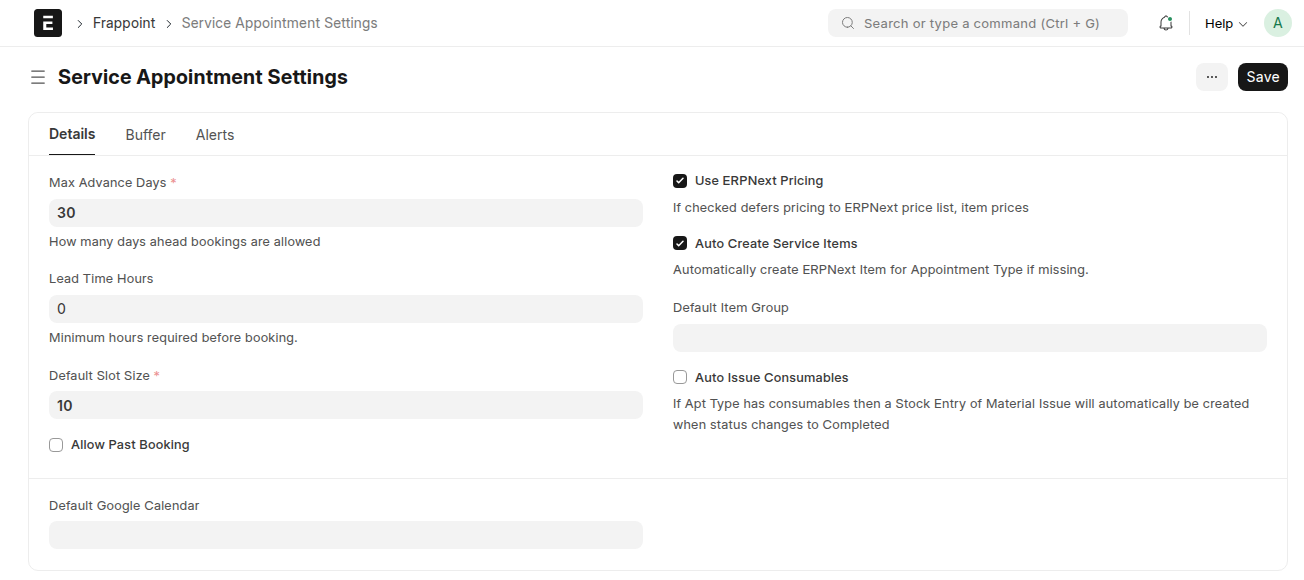
These settings control when appointments can be booked.
| Field | Description | Usage |
|---|---|---|
| Max Advance Days | Defines how many days into the future a booking is allowed. | 30 means customers can only book up to 30 days ahead. |
| Lead Time (Hours) | Minimum number of hours required before an appointment can be booked. Prevents last-minute bookings. |
2 means a booking must be at least 2 hours in the future. |
| Allow Past Booking | Enables or disables booking appointments in the past. | Useful for administrative back-entry or data migration. |
| Max Past Days | Limits how far back an appointment can be created if past booking is enabled. | 7 allows backdating appointments up to one week. |
| Default Slot Size | Defines the base slot duration (in minutes). Used when generating provider slots. |
15 creates slots like 09:00–09:15, 09:15–09:30, etc. |
| Use ERPNext Pricing | If enabled, service prices are derived from ERPNext Price Lists. If disabled, pricing is managed directly within Frappoint. |
This option controls how Frappoint integrates with ERPNext items and pricing |
| Auto Create Service Items | Automatically creates ERPNext Item records when new services are defined. | Useful for billing, invoicing, and reporting. |
| Auto Issue Consumables | Automatically issues consumable items when an appointment is completed. | Ideal for clinics or service centers tracking inventory usage. |
| Default Google Calendar | Calendar used when syncing appointments. | Providers can override this with their own calendars if configured. |
Global Buffer Settings
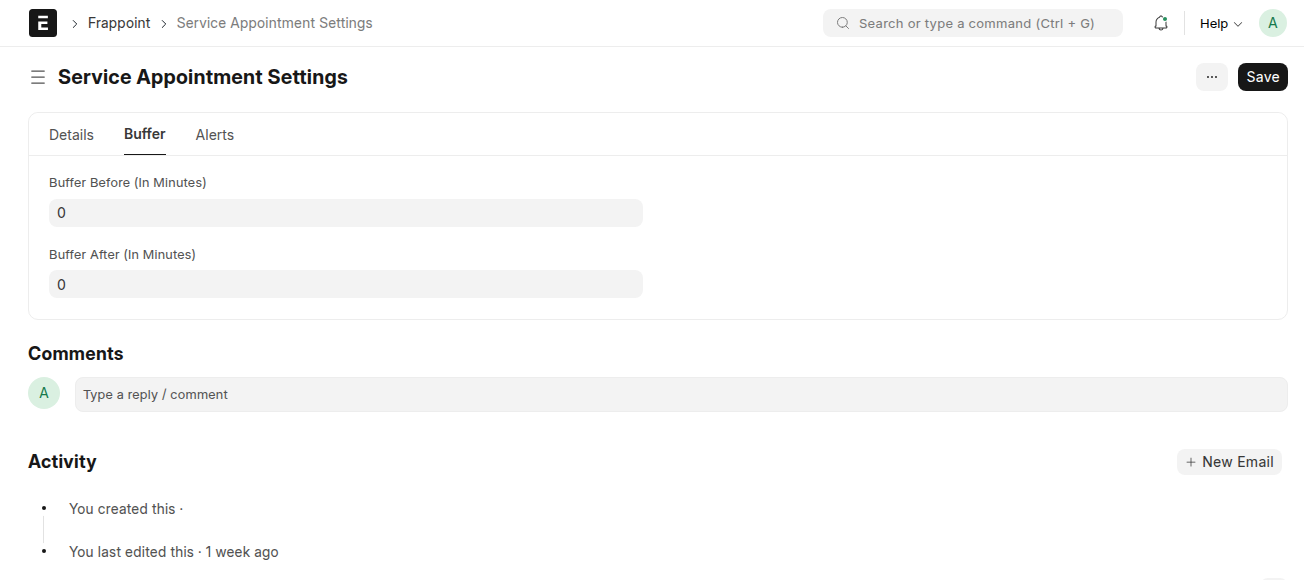
These buffers apply when a service does not define its own buffer rules.
| Field | Description | Usage |
|---|---|---|
| Buffer Before | Default buffer time (in minutes) before a service starts. | Used for preparation, setup, or cleaning. |
| Buffer After | Default buffer time (in minutes) after a service ends. | Used for cleanup or provider rest time. |
Service-specific buffers, if defined, override these defaults.
Notifications & Alerts
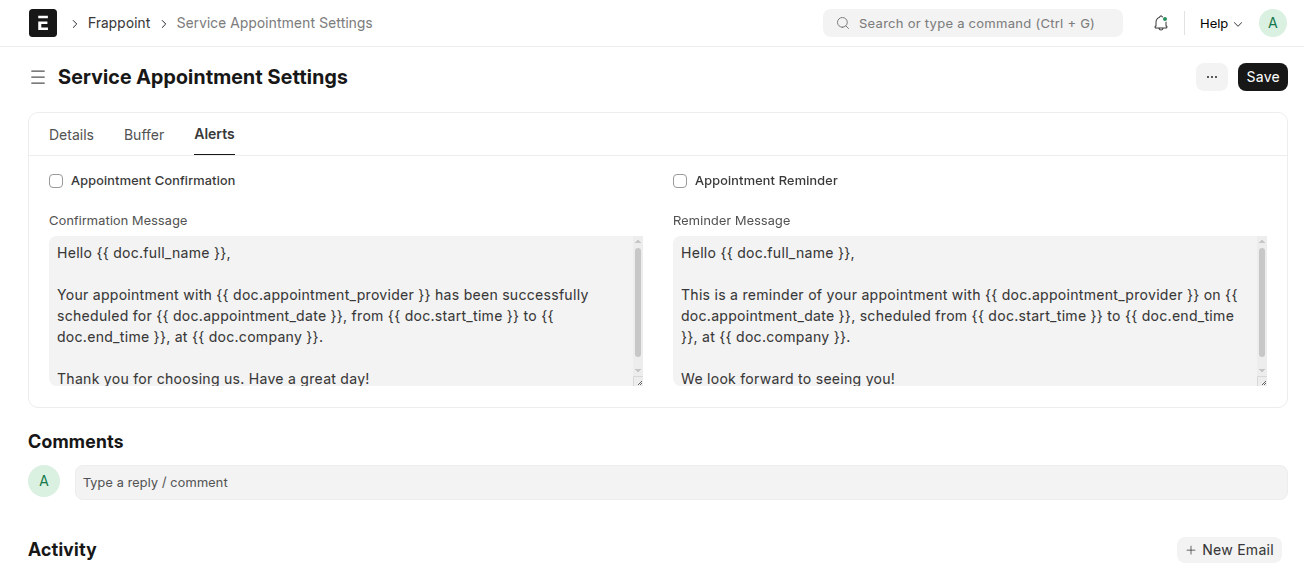
These settings control customer-facing communication.
| Field | Description |
|---|---|
| Appointment Confirmation | Enables confirmation notifications upon booking. |
| Confirmation Message | Custom message sent when a booking is confirmed. Can include placeholders such as service name, date, or time. |
| Appointment Reminder | Enables reminder notifications before the appointment. |
| Reminder Message | Message content for reminders. Typically sent a configurable time before the appointment. |
Payment Integration

These allow you to configure online checkout flows for customers booking for a service
| Field | Description |
|---|---|
| Payment Gateways | Specific payment gateway customers can use to pay for the service they are booking for |