

%20--%3E%3Cmetadata%20xmlns%3Ardf%3D%22http%3A%2F%2Fwww.w3.org%2F1999%2F02%2F22-rdf-syntax-ns%23%22%20xmlns%3Axsi%3D%22http%3A%2F%2Fwww.w3.org%2F2001%2FXMLSchema-instance%22%20xmlns%3Adc%3D%22http%3A%2F%2Fpurl.org%2Fdc%2Felements%2F1.1%2F%22%20xmlns%3Adcterms%3D%22http%3A%2F%2Fpurl.org%2Fdc%2Fterms%2F%22%3E%3Crdf%3ARDF%3E%3Crdf%3ADescription%3E%3Cdc%3Atitle%3EWaves%3C%2Fdc%3Atitle%3E%3Cdc%3Acreator%3EDiceBear%3C%2Fdc%3Acreator%3E%3Cdc%3Asource%20xsi%3Atype%3D%22dcterms%3AURI%22%3Ehttps%3A%2F%2Fwww.dicebear.com%3C%2Fdc%3Asource%3E%3Cdcterms%3Alicense%20xsi%3Atype%3D%22dcterms%3AURI%22%3Ehttps%3A%2F%2Fcreativecommons.org%2Fpublicdomain%2Fzero%2F1.0%2F%3C%2Fdcterms%3Alicense%3E%3Cdc%3Arights%3E%E2%80%9CWaves%E2%80%9D%20(https%3A%2F%2Fwww.dicebear.com)%20by%20%E2%80%9CDiceBear%E2%80%9D%2C%20licensed%20under%20%E2%80%9CCC0%201.0%E2%80%9D%20(https%3A%2F%2Fcreativecommons.org%2Fpublicdomain%2Fzero%2F1.0%2F)%3C%2Fdc%3Arights%3E%3C%2Frdf%3ADescription%3E%3C%2Frdf%3ARDF%3E%3C%2Fmetadata%3E%3Cdefs%3E%3Cg%20id%3D%22layer-ripple-e49e13db%22%3E%3Cpath%20d%3D%22M0%2012c6%200%2012%2010%2018%2010s12-10%2018-10%2012%2010%2018%2010%2012-10%2018-10%2012%2010%2018%2010%2012-10%2018-10%2012%2010%2018%2010%2012-10%2018-10%2012%2010%2018%2010%2012-10%2018-10%2012%206%2020%205v113H0Z%22%20fill%3D%22%23ffffff%22%2F%3E%3C%2Fg%3E%3Cg%20id%3D%22layer-rolling-e49e13db%22%3E%3Cpath%20d%3D%22M0%208c12%200%2023%2016%2035%2016S58%208%2070%208s23%2016%2035%2016%2023-16%2035-16%2023%2016%2035%2016c8%200%2017-8%2025-10v116H0Z%22%20fill%3D%22%23ffffff%22%2F%3E%3C%2Fg%3E%3Cg%20id%3D%22layer-calm-e49e13db%22%3E%3Cpath%20d%3D%22M0%2016c28%200%2052-6%2084-5s72%2010%20116%205v114H0Z%22%20fill%3D%22%23ffffff%22%2F%3E%3C%2Fg%3E%3Cg%20id%3D%22layer-surge-e49e13db%22%3E%3Cpath%20d%3D%22M0%206c24%200%2044%204%2062%2014%2016%208%2034%208%2052%202%2020-7%2038-12%2054-12%2012%200%2024%204%2032%206v114H0Z%22%20fill%3D%22%23ffffff%22%2F%3E%3C%2Fg%3E%3Cg%20id%3D%22body-quintet-e49e13db%22%3E%3Cg%20opacity%3D%22.14%22%3E%3Cg%20class%3D%22dbwa-l1%22%3E%3Cuse%20transform%3D%22translate(-50)%20translate(21.9728%2C%200.50011)%22%20href%3D%22%23layer-ripple-e49e13db%22%2F%3E%3C%2Fg%3E%3C%2Fg%3E%3Cg%20opacity%3D%22.24%22%3E%3Cg%20class%3D%22dbwa-l2%22%3E%3Cuse%20transform%3D%22translate(-50%2017)%20translate(5.9028%2C%20-4.66596)%22%20href%3D%22%23layer-rolling-e49e13db%22%2F%3E%3C%2Fg%3E%3C%2Fg%3E%3Cg%20opacity%3D%22.34%22%3E%3Cg%20class%3D%22dbwa-l3%22%3E%3Cuse%20transform%3D%22translate(-50%2034)%20translate(-14.5466%2C%201.70495)%22%20href%3D%22%23layer-calm-e49e13db%22%2F%3E%3C%2Fg%3E%3C%2Fg%3E%3Cg%20opacity%3D%22.42%22%3E%3Cg%20class%3D%22dbwa-l4%22%3E%3Cuse%20transform%3D%22translate(-50%2051)%20translate(11.789%2C%20-2.49886)%22%20href%3D%22%23layer-surge-e49e13db%22%2F%3E%3C%2Fg%3E%3C%2Fg%3E%3Cg%20opacity%3D%22.48%22%3E%3Cg%20class%3D%22dbwa-l5%22%3E%3Cuse%20transform%3D%22translate(-50%2068)%20translate(21.0082%2C%202.66877)%22%20href%3D%22%23layer-rolling-e49e13db%22%2F%3E%3C%2Fg%3E%3C%2Fg%3E%3C%2Fg%3E%3Cg%20id%3D%22bodyFree-default-e49e13db%22%3E%3Cuse%20href%3D%22%23body-quintet-e49e13db%22%2F%3E%3C%2Fg%3E%3Cg%20id%3D%22rotation-free-e49e13db%22%3E%3Cuse%20transform%3D%22rotate(-8.8373%2C%2050%2C%2050)%22%20href%3D%22%23bodyFree-default-e49e13db%22%2F%3E%3C%2Fg%3E%3Cg%20id%3D%22animation-none-e49e13db%22%3E%3C%2Fg%3E%3CclipPath%20id%3D%22clip-e49e13db%22%3E%3Crect%20width%3D%22100%22%20height%3D%22100%22%20rx%3D%220%22%20ry%3D%220%22%2F%3E%3C%2FclipPath%3E%3C%2Fdefs%3E%3Cg%20clip-path%3D%22url(%23clip-e49e13db)%22%3E%3Crect%20width%3D%22100%22%20height%3D%22100%22%20fill%3D%22%234338ca%22%2F%3E%3Cuse%20href%3D%22%23rotation-free-e49e13db%22%2F%3E%3Cuse%20href%3D%22%23animation-none-e49e13db%22%2F%3E%3C%2Fg%3E%3C%2Fsvg%3E)



Requirements & Installation
Requirements
Before installing, ensure the following are in place:
| Requirement | Details |
|---|---|
| ERPNext Version | Version 14 or Version 15 (recommended) |
| Frappe Framework | Compatible version matching ERPNext |
| Bench | Installed and configured on your server |
| Tevin Middleware License | Purchase from tevin.eu |
| API Server Address | Provided by Tevin on purchase (sandbox + production) |
| Sender ID | Provided by Tevin as part of API credentials |
| KRA PIN | Your business must be VAT-registered with KRA |
| Internet Access | The ERPNext server must have outbound HTTPS access to Tevin's API |
Obtaining the Tevin Middleware
The Type-C Middleware for Accounting is a commercial product sold by Tevin. It acts as the certified bridge between your accounting software and KRA's TIMS infrastructure.
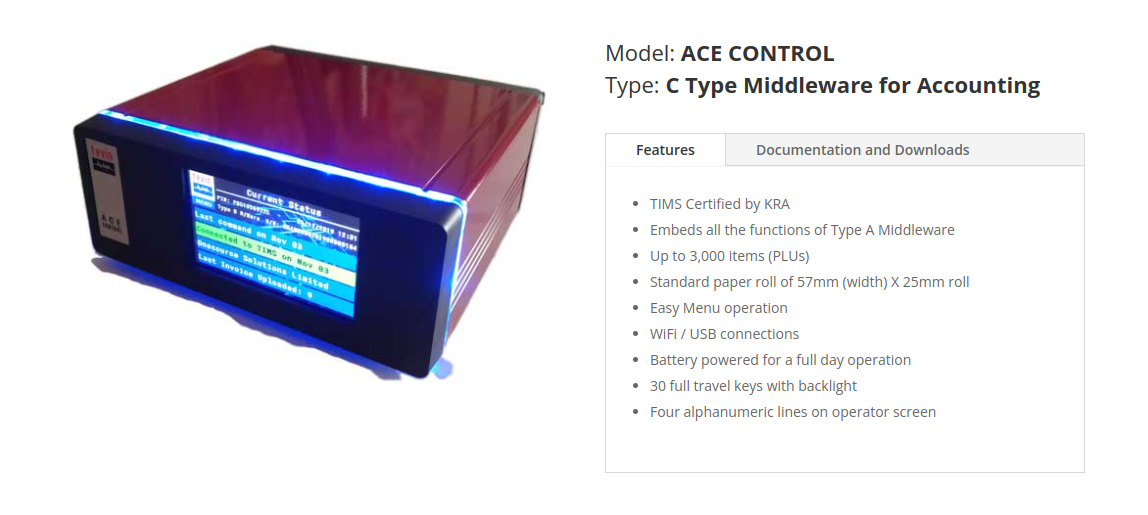 Tevin Type-C Middleware for Accounting
- Visit https://tevin.eu/type-c-middleware/
- Purchase the middleware licence appropriate for your business size
- Tevin will provision:
- A sandbox API server URL (for testing)
- A production API server URL (for live operations)
- A Sender ID unique to your account
Keep these credentials secure — they are your authentication to KRA via Tevin.
Installation
Self-Hosted / Manual
Follow these steps on a server where Frappe bench is already set up and ERPNext is installed.
Step 1: Install Frappe Bench (if not already done)
# Follow the official Frappe bench installation guide
# https://github.com/frappe/bench
pip install frappe-bench
bench init frappe-bench --frappe-branch version-15
cd frappe-bench
Step 2: Install ERPNext (if not already done)
bench get-app --branch version-15 erpnext
bench new-site your-site-name.local
bench --site your-site-name.local install-app erpnext
Refer to the ERPNext installation guide for a complete walkthrough.
Step 3: Add the TIMS Tevin Type-C App to Bench
bench get-app --branch {branch-name} https://github.com/navariltd/TIMS-Tevin-Type-C-Integration.git
Replace {branch-name} with the correct branch for your ERPNext version. Check the repository for available branches (e.g., version-15, version-14).
Example (ERPNext v15):
bench get-app --branch version-15 https://github.com/navariltd/TIMS-Tevin-Type-C-Integration.git
Step 4: Install the App on Your Site
bench --site {sitename} install-app tims_tevic_typec_integration
Replace {sitename} with your actual site name.
Step 5: Run Migrations
bench --site {sitename} migrate
Step 6: Restart Bench
bench restart
Verifying Installation
After restarting, log in to ERPNext and search for "TIMS Settings" in the search bar. If the doctype appears, the app has been installed successfully.
Frappe Cloud
If you are hosting on Frappe Cloud, the process is simpler and does not require any server management.
- Sign up at frappecloud.com if you haven't already
- Create a new Bench — select Frappe Version 15 or above
- Create a new Site on that bench
- During site creation, in the Apps to Install section, select:
- ERPNext
- TIMS Tevin Type-C Integration
- Complete the setup — the site will be ready within a few minutes with the app pre-installed
For enterprise deployments or custom configurations on Frappe Cloud, contact Navari for implementation support.