%20--%3E%3Cmetadata%20xmlns%3Ardf%3D%22http%3A%2F%2Fwww.w3.org%2F1999%2F02%2F22-rdf-syntax-ns%23%22%20xmlns%3Axsi%3D%22http%3A%2F%2Fwww.w3.org%2F2001%2FXMLSchema-instance%22%20xmlns%3Adc%3D%22http%3A%2F%2Fpurl.org%2Fdc%2Felements%2F1.1%2F%22%20xmlns%3Adcterms%3D%22http%3A%2F%2Fpurl.org%2Fdc%2Fterms%2F%22%3E%3Crdf%3ARDF%3E%3Crdf%3ADescription%3E%3Cdc%3Atitle%3ELoops%3C%2Fdc%3Atitle%3E%3Cdc%3Acreator%3EDiceBear%3C%2Fdc%3Acreator%3E%3Cdc%3Asource%20xsi%3Atype%3D%22dcterms%3AURI%22%3Ehttps%3A%2F%2Fwww.dicebear.com%3C%2Fdc%3Asource%3E%3Cdcterms%3Alicense%20xsi%3Atype%3D%22dcterms%3AURI%22%3Ehttps%3A%2F%2Fcreativecommons.org%2Fpublicdomain%2Fzero%2F1.0%2F%3C%2Fdcterms%3Alicense%3E%3Cdc%3Arights%3E%E2%80%9CLoops%E2%80%9D%20(https%3A%2F%2Fwww.dicebear.com)%20by%20%E2%80%9CDiceBear%E2%80%9D%2C%20licensed%20under%20%E2%80%9CCC0%201.0%E2%80%9D%20(https%3A%2F%2Fcreativecommons.org%2Fpublicdomain%2Fzero%2F1.0%2F)%3C%2Fdc%3Arights%3E%3C%2Frdf%3ADescription%3E%3C%2Frdf%3ARDF%3E%3C%2Fmetadata%3E%3Cdefs%3E%3Cg%20id%3D%22tile-default-c50917e1%22%3E%3Cpath%20d%3D%22M0%2014A14%2014%200%200%201%2014%200m0%2028a14%2014%200%200%200%2014-14%22%20stroke-width%3D%228%22%20stroke%3D%22%23ffffff%22%2F%3E%3C%2Fg%3E%3Cg%20id%3D%22pattern-default-c50917e1%22%3E%3Cg%20style%3D%22mix-blend-mode%3Aoverlay%22%3E%3Cg%20class%3D%22dblo-g1%22%3E%3Cuse%20transform%3D%22translate(4%204)%20rotate(90%2C%2014%2C%2014)%22%20href%3D%22%23tile-default-c50917e1%22%2F%3E%3C%2Fg%3E%3Cg%20class%3D%22dblo-g2%22%3E%3Cuse%20transform%3D%22translate(32%204)%22%20href%3D%22%23tile-default-c50917e1%22%2F%3E%3C%2Fg%3E%3Cg%20class%3D%22dblo-g3%22%3E%3Cuse%20transform%3D%22translate(60%204)%20rotate(90%2C%2014%2C%2014)%22%20href%3D%22%23tile-default-c50917e1%22%2F%3E%3C%2Fg%3E%3Cg%20class%3D%22dblo-g1%22%3E%3Cuse%20transform%3D%22translate(4%2032)%20rotate(90%2C%2014%2C%2014)%22%20href%3D%22%23tile-default-c50917e1%22%2F%3E%3C%2Fg%3E%3Cg%20class%3D%22dblo-g2%22%3E%3Cuse%20transform%3D%22translate(32%2032)%22%20href%3D%22%23tile-default-c50917e1%22%2F%3E%3C%2Fg%3E%3Cg%20class%3D%22dblo-g3%22%3E%3Cuse%20transform%3D%22translate(60%2032)%20rotate(90%2C%2014%2C%2014)%22%20href%3D%22%23tile-default-c50917e1%22%2F%3E%3C%2Fg%3E%3Cg%20class%3D%22dblo-g1%22%3E%3Cuse%20transform%3D%22translate(4%2060)%22%20href%3D%22%23tile-default-c50917e1%22%2F%3E%3C%2Fg%3E%3Cg%20class%3D%22dblo-g2%22%3E%3Cuse%20transform%3D%22translate(32%2060)%22%20href%3D%22%23tile-default-c50917e1%22%2F%3E%3C%2Fg%3E%3Cg%20class%3D%22dblo-g3%22%3E%3Cuse%20transform%3D%22translate(60%2060)%20rotate(90%2C%2014%2C%2014)%22%20href%3D%22%23tile-default-c50917e1%22%2F%3E%3C%2Fg%3E%3C%2Fg%3E%3Cg%20opacity%3D%22.5%22%3E%3Cg%20class%3D%22dblo-g1%22%3E%3Cuse%20transform%3D%22translate(4%204)%20rotate(90%2C%2014%2C%2014)%22%20href%3D%22%23tile-default-c50917e1%22%2F%3E%3C%2Fg%3E%3Cg%20class%3D%22dblo-g2%22%3E%3Cuse%20transform%3D%22translate(32%204)%22%20href%3D%22%23tile-default-c50917e1%22%2F%3E%3C%2Fg%3E%3Cg%20class%3D%22dblo-g3%22%3E%3Cuse%20transform%3D%22translate(60%204)%20rotate(90%2C%2014%2C%2014)%22%20href%3D%22%23tile-default-c50917e1%22%2F%3E%3C%2Fg%3E%3Cg%20class%3D%22dblo-g1%22%3E%3Cuse%20transform%3D%22translate(4%2032)%20rotate(90%2C%2014%2C%2014)%22%20href%3D%22%23tile-default-c50917e1%22%2F%3E%3C%2Fg%3E%3Cg%20class%3D%22dblo-g2%22%3E%3Cuse%20transform%3D%22translate(32%2032)%22%20href%3D%22%23tile-default-c50917e1%22%2F%3E%3C%2Fg%3E%3Cg%20class%3D%22dblo-g3%22%3E%3Cuse%20transform%3D%22translate(60%2032)%20rotate(90%2C%2014%2C%2014)%22%20href%3D%22%23tile-default-c50917e1%22%2F%3E%3C%2Fg%3E%3Cg%20class%3D%22dblo-g1%22%3E%3Cuse%20transform%3D%22translate(4%2060)%22%20href%3D%22%23tile-default-c50917e1%22%2F%3E%3C%2Fg%3E%3Cg%20class%3D%22dblo-g2%22%3E%3Cuse%20transform%3D%22translate(32%2060)%22%20href%3D%22%23tile-default-c50917e1%22%2F%3E%3C%2Fg%3E%3Cg%20class%3D%22dblo-g3%22%3E%3Cuse%20transform%3D%22translate(60%2060)%20rotate(90%2C%2014%2C%2014)%22%20href%3D%22%23tile-default-c50917e1%22%2F%3E%3C%2Fg%3E%3C%2Fg%3E%3C%2Fg%3E%3Cg%20id%3D%22animation-none-c50917e1%22%3E%3C%2Fg%3E%3CclipPath%20id%3D%22clip-c50917e1%22%3E%3Crect%20width%3D%22100%22%20height%3D%22100%22%20rx%3D%220%22%20ry%3D%220%22%2F%3E%3C%2FclipPath%3E%3C%2Fdefs%3E%3Cg%20clip-path%3D%22url(%23clip-c50917e1)%22%3E%3Crect%20width%3D%22100%22%20height%3D%22100%22%20fill%3D%22%230f766e%22%2F%3E%3Cuse%20transform%3D%22translate(4%204)%22%20href%3D%22%23pattern-default-c50917e1%22%2F%3E%3Cuse%20href%3D%22%23animation-none-c50917e1%22%2F%3E%3C%2Fg%3E%3C%2Fsvg%3E)
%20--%3E%3Cmetadata%20xmlns%3Ardf%3D%22http%3A%2F%2Fwww.w3.org%2F1999%2F02%2F22-rdf-syntax-ns%23%22%20xmlns%3Axsi%3D%22http%3A%2F%2Fwww.w3.org%2F2001%2FXMLSchema-instance%22%20xmlns%3Adc%3D%22http%3A%2F%2Fpurl.org%2Fdc%2Felements%2F1.1%2F%22%20xmlns%3Adcterms%3D%22http%3A%2F%2Fpurl.org%2Fdc%2Fterms%2F%22%3E%3Crdf%3ARDF%3E%3Crdf%3ADescription%3E%3Cdc%3Atitle%3ELoops%3C%2Fdc%3Atitle%3E%3Cdc%3Acreator%3EDiceBear%3C%2Fdc%3Acreator%3E%3Cdc%3Asource%20xsi%3Atype%3D%22dcterms%3AURI%22%3Ehttps%3A%2F%2Fwww.dicebear.com%3C%2Fdc%3Asource%3E%3Cdcterms%3Alicense%20xsi%3Atype%3D%22dcterms%3AURI%22%3Ehttps%3A%2F%2Fcreativecommons.org%2Fpublicdomain%2Fzero%2F1.0%2F%3C%2Fdcterms%3Alicense%3E%3Cdc%3Arights%3E%E2%80%9CLoops%E2%80%9D%20(https%3A%2F%2Fwww.dicebear.com)%20by%20%E2%80%9CDiceBear%E2%80%9D%2C%20licensed%20under%20%E2%80%9CCC0%201.0%E2%80%9D%20(https%3A%2F%2Fcreativecommons.org%2Fpublicdomain%2Fzero%2F1.0%2F)%3C%2Fdc%3Arights%3E%3C%2Frdf%3ADescription%3E%3C%2Frdf%3ARDF%3E%3C%2Fmetadata%3E%3Cdefs%3E%3Cg%20id%3D%22tile-default-bd85266d%22%3E%3Cpath%20d%3D%22M0%2014A14%2014%200%200%201%2014%200m0%2028a14%2014%200%200%200%2014-14%22%20stroke-width%3D%228%22%20stroke%3D%22%23ffffff%22%2F%3E%3C%2Fg%3E%3Cg%20id%3D%22pattern-default-bd85266d%22%3E%3Cg%20style%3D%22mix-blend-mode%3Aoverlay%22%3E%3Cg%20class%3D%22dblo-g1%22%3E%3Cuse%20transform%3D%22translate(4%204)%22%20href%3D%22%23tile-default-bd85266d%22%2F%3E%3C%2Fg%3E%3Cg%20class%3D%22dblo-g2%22%3E%3Cuse%20transform%3D%22translate(32%204)%22%20href%3D%22%23tile-default-bd85266d%22%2F%3E%3C%2Fg%3E%3Cg%20class%3D%22dblo-g3%22%3E%3Cuse%20transform%3D%22translate(60%204)%22%20href%3D%22%23tile-default-bd85266d%22%2F%3E%3C%2Fg%3E%3Cg%20class%3D%22dblo-g1%22%3E%3Cuse%20transform%3D%22translate(4%2032)%20rotate(90%2C%2014%2C%2014)%22%20href%3D%22%23tile-default-bd85266d%22%2F%3E%3C%2Fg%3E%3Cg%20class%3D%22dblo-g2%22%3E%3Cuse%20transform%3D%22translate(32%2032)%22%20href%3D%22%23tile-default-bd85266d%22%2F%3E%3C%2Fg%3E%3Cg%20class%3D%22dblo-g3%22%3E%3Cuse%20transform%3D%22translate(60%2032)%20rotate(90%2C%2014%2C%2014)%22%20href%3D%22%23tile-default-bd85266d%22%2F%3E%3C%2Fg%3E%3Cg%20class%3D%22dblo-g1%22%3E%3Cuse%20transform%3D%22translate(4%2060)%22%20href%3D%22%23tile-default-bd85266d%22%2F%3E%3C%2Fg%3E%3Cg%20class%3D%22dblo-g2%22%3E%3Cuse%20transform%3D%22translate(32%2060)%22%20href%3D%22%23tile-default-bd85266d%22%2F%3E%3C%2Fg%3E%3Cg%20class%3D%22dblo-g3%22%3E%3Cuse%20transform%3D%22translate(60%2060)%22%20href%3D%22%23tile-default-bd85266d%22%2F%3E%3C%2Fg%3E%3C%2Fg%3E%3Cg%20opacity%3D%22.5%22%3E%3Cg%20class%3D%22dblo-g1%22%3E%3Cuse%20transform%3D%22translate(4%204)%22%20href%3D%22%23tile-default-bd85266d%22%2F%3E%3C%2Fg%3E%3Cg%20class%3D%22dblo-g2%22%3E%3Cuse%20transform%3D%22translate(32%204)%22%20href%3D%22%23tile-default-bd85266d%22%2F%3E%3C%2Fg%3E%3Cg%20class%3D%22dblo-g3%22%3E%3Cuse%20transform%3D%22translate(60%204)%22%20href%3D%22%23tile-default-bd85266d%22%2F%3E%3C%2Fg%3E%3Cg%20class%3D%22dblo-g1%22%3E%3Cuse%20transform%3D%22translate(4%2032)%20rotate(90%2C%2014%2C%2014)%22%20href%3D%22%23tile-default-bd85266d%22%2F%3E%3C%2Fg%3E%3Cg%20class%3D%22dblo-g2%22%3E%3Cuse%20transform%3D%22translate(32%2032)%22%20href%3D%22%23tile-default-bd85266d%22%2F%3E%3C%2Fg%3E%3Cg%20class%3D%22dblo-g3%22%3E%3Cuse%20transform%3D%22translate(60%2032)%20rotate(90%2C%2014%2C%2014)%22%20href%3D%22%23tile-default-bd85266d%22%2F%3E%3C%2Fg%3E%3Cg%20class%3D%22dblo-g1%22%3E%3Cuse%20transform%3D%22translate(4%2060)%22%20href%3D%22%23tile-default-bd85266d%22%2F%3E%3C%2Fg%3E%3Cg%20class%3D%22dblo-g2%22%3E%3Cuse%20transform%3D%22translate(32%2060)%22%20href%3D%22%23tile-default-bd85266d%22%2F%3E%3C%2Fg%3E%3Cg%20class%3D%22dblo-g3%22%3E%3Cuse%20transform%3D%22translate(60%2060)%22%20href%3D%22%23tile-default-bd85266d%22%2F%3E%3C%2Fg%3E%3C%2Fg%3E%3C%2Fg%3E%3Cg%20id%3D%22animation-none-bd85266d%22%3E%3C%2Fg%3E%3CclipPath%20id%3D%22clip-bd85266d%22%3E%3Crect%20width%3D%22100%22%20height%3D%22100%22%20rx%3D%220%22%20ry%3D%220%22%2F%3E%3C%2FclipPath%3E%3C%2Fdefs%3E%3Cg%20clip-path%3D%22url(%23clip-bd85266d)%22%3E%3Crect%20width%3D%22100%22%20height%3D%22100%22%20fill%3D%22%23c2410c%22%2F%3E%3Cuse%20transform%3D%22translate(4%204)%22%20href%3D%22%23pattern-default-bd85266d%22%2F%3E%3Cuse%20href%3D%22%23animation-none-bd85266d%22%2F%3E%3C%2Fg%3E%3C%2Fsvg%3E)







🧪 Demo Data for Utility Billing & Property Management
🧪 Demo Data for Utility Billing & Property Management
Overview
The demo generator builds a complete, explorable dataset for the desk and the
Rental Portal. It creates a separate Utility and Rental (Demo) company, so
demo bills, contracts, meter readings and portal users stay isolated from your
production company.
⚠️ Development and staging only. Demo records share one documented
password and use external image URLs. Do not enable demo accounts in
production.
The generator is idempotent where it can be: existing master records are
skipped, generated serial numbers and support tickets are not duplicated, and
service requests/transactions are not recreated for properties already leased.
🎯 What Gets Created
| Area | Demo data |
|---|---|
| Customers | 12 residential and commercial customers |
| Portal users | 12 Website Users linked through Customer.portal_users |
| Properties | 6 buildings/estates and 26 lettable units |
| Images | Cover image + gallery for every property, using free Unsplash URLs |
| Service requests | 12 requests: 10 signed tenancies and 2 unsigned reservations |
| Contracts | One submitted Contract per request; signed where the request is signed |
| Rent pricing | Item Price schedules or Auto Repeat, depending on Rent Billing Approach |
| Utility pricing | Water, Electricity and Sewer Item Prices with tiered tariff blocks for residential and commercial price lists |
| Meter readings | 11 submitted readings across occupied units, generating meter Sales Orders |
| Sales Orders | Rent Sales Orders plus the Sales Orders generated by meter readings |
| Sales Invoices | One first-period rent invoice per leased property |
| Support tickets | 9 Issues linked to properties/requests, including replies and resolved examples |
| Billing rules | Three Billing Adjustment Rule examples (fixed, linear and compounding) |
The names, unit sizes, rents and lease dates are deterministic. Dates are
relative to the day the demo is generated, so the data does not become stale.
🏘️ Demo Properties and Images
The demo includes:
- The Pinnacle Towers - Kilimani – studio, one, two-bedroom and penthouse units
- Kileleshwa Heights Apartments – bedsitter to three-bedroom units
- Greenpark Estate - Runda – townhouses and a maisonette
- Westlands Business Plaza – office suites and a retail shop
- Mombasa Beachfront Villas – beachfront villas
- Ruiru Garden Court – affordable garden apartments
Every building and unit has a cover_image and a populated image_gallery.
The images are remote URLs from Unsplash, so the gallery works without
uploading files. The portal falls back to its initials placeholder when the
browser is offline or an image cannot be loaded.
👤 Sample Portal Accounts
Each account is a Website User with the Customer role, linked to its Customer
through Customer.portal_users.
Password for every demo account: Demo@12345
| Customer | |
|---|---|
| Wanjiku Kamau | wanjiku.kamau@demo.utilitybilling.test |
| Ochieng Otieno | ochieng.otieno@demo.utilitybilling.test |
| Daniel Mwangi | daniel.mwangi@demo.utilitybilling.test |
| Amina Hassan | amina.hassan@demo.utilitybilling.test |
| Faith Njeri | faith.njeri@demo.utilitybilling.test |
| Peter Omondi | peter.omondi@demo.utilitybilling.test |
| Brian Kiptoo | brian.kiptoo@demo.utilitybilling.test |
| Grace Achieng | grace.achieng@demo.utilitybilling.test |
| Nairobi Enterprises Ltd | finance@nairobi-enterprises.demo.utilitybilling.test |
| Mombasa Trading Co. | accounts@mombasa-trading.demo.utilitybilling.test |
| Savanna Retail Group | leases@savanna-retail.demo.utilitybilling.test |
| Kilimani Health Partners | admin@kilimani-health.demo.utilitybilling.test |
Sign in at /rental-portal with any account to exercise the tenant flows.
Change or remove these accounts before using the dataset outside a demo or
training environment.
💰 Pricing: Item Price vs Auto Repeat
The demo does not change Utility Billing Settings → Rent Billing Approach.
It follows the approach already configured on the site.
Item Price approach
- Each leased property gets a dated Item Price schedule built from its lease
start/end and its linkedBilling Adjustment Rule. - The schedule is scoped to the tenant Customer and the property's service item.
- Available units receive an open-ended base Item Price so the portal booking
summary has a rent amount before a lease exists. - First-period rent invoices are created at the Item Price valid on the invoice
date. Sales Orders and Sales Invoices still honour the configured creation
state (DraftorSubmitted).
Auto Repeat approach
- Every property receives a base rent Item Price.
- One first-period Sales Invoice is created per leased property, with an
Auto Repeat document linked to it. - The anchor invoice is submitted so the Auto Repeat schedule is runnable.
- The demo starts a historical lease's Auto Repeat from today (while keeping the
Contract dates) to avoid an Auto Repeat whose first increment date has already
passed. - If
Sales Invoicedoes not yet allow Auto Repeat, the demo applies the same
setting as the app'sset_allow_auto_repeat_sales_invoicepatch.
Meter readings and tariff blocks
Meter Item Prices are created for both Standard Residential and Standard
Commercial price lists. Water, Electricity and Sewer use tiered
Item Price Tariff rows (Block 1, Block 2, ...). Submitting a Meter Reading
therefore fills its read-only Rates table with one row per block and creates
a meter Sales Order.
📄 Contracts, Billing and Support Data
- Signed requests are submitted and marked
is_signed, so their units appear as
Active in the portal. - Unsigned requests remain
Reservedand still show in My Bookings. - Rent Sales Orders carry the request link; rent Sales Invoices carry the request
and property service item. Meter readings create their own Sales Orders. - Support tickets cover open, replied, on-hold and resolved states. A few include
a first support reply, so the portal conversation timeline is populated. - Payment gateway accounts are not seeded. The portal payment action requires
a configuredPayment Gateway Accountfor the demo company.
⚙️ How to Generate Demo Data
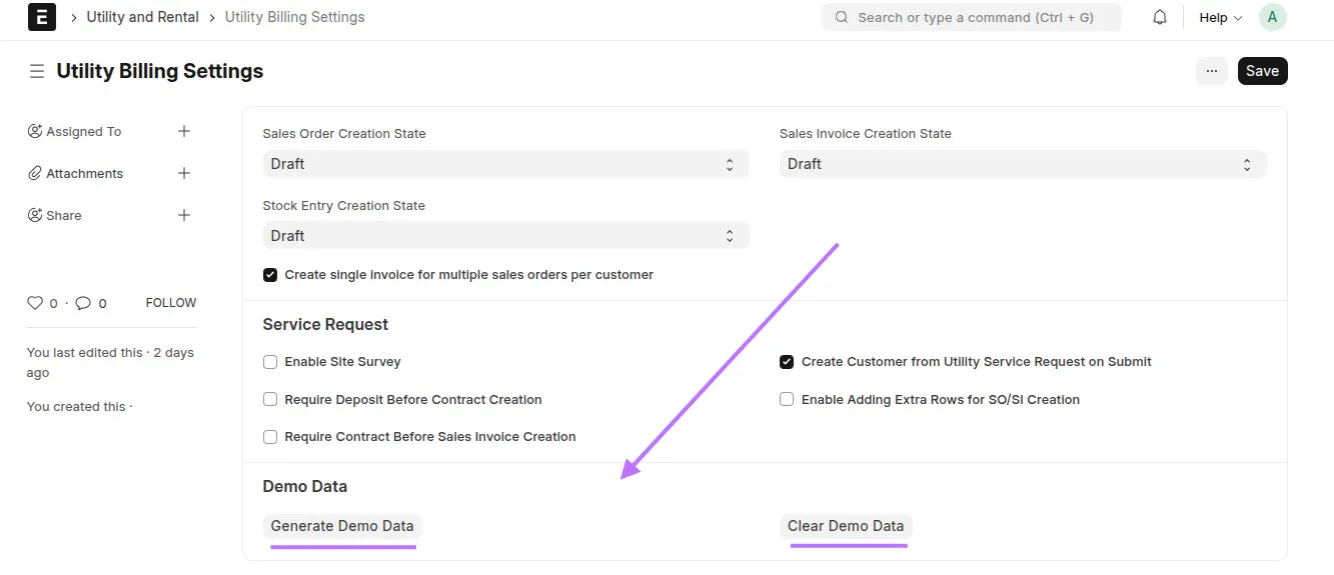
Option 1 – Utility Billing Settings
Open Utility Billing Settings and click Generate Demo Data.
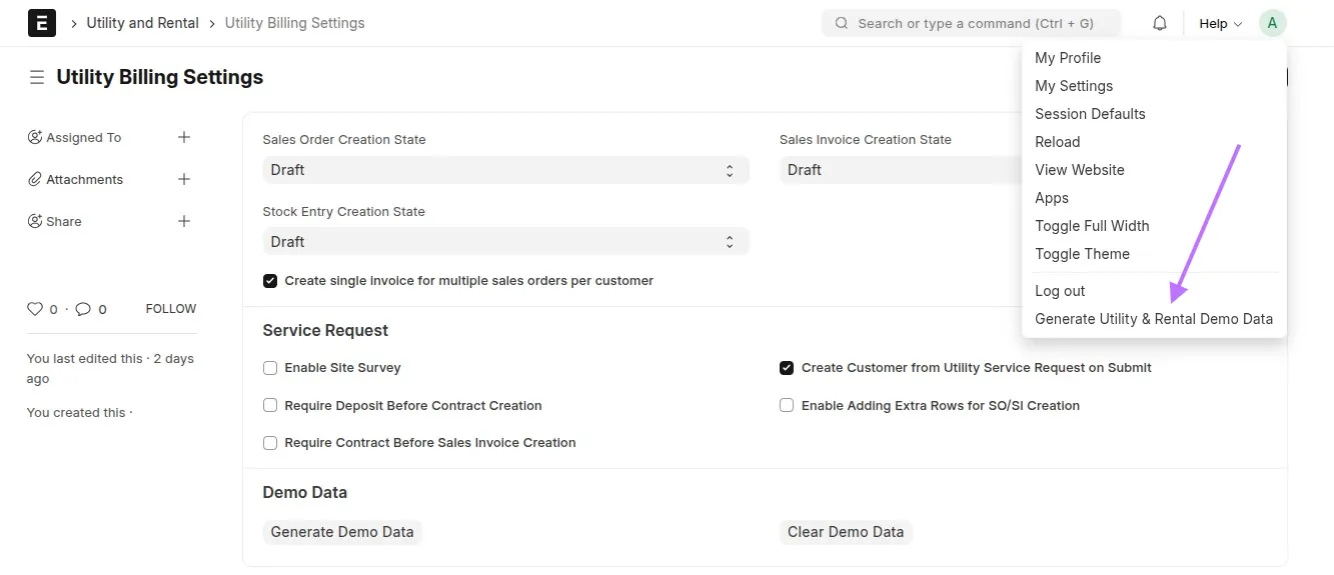
Option 2 – Toolbar quick action
Use the demo quick action from the app toolbar.
Option 3 – Bench
bench --site <site> execute utility_billing.setup.demo.setup_demo_data
The operation is restricted to a System Manager.
🎥 Video
🧹 Clearing Demo Data
Use Clear Demo Data from Utility Billing Settings or the toolbar, or run:
bench --site <site> execute utility_billing.setup.demo.clear_demo_data
Clearing removes:
- demo Sales Orders, Sales Invoices and Auto Repeats;
- meter readings, contracts, service requests and bill structures;
- demo support Issues and their comments;
- generated property Item Prices and property service items;
- demo portal Users and their
Customer.portal_userslinks; - demo master data and the Utility and Rental (Demo) company.
Only records belonging to the demo company/Customers are removed; manually
created data in other companies is untouched.
❗ Important Notes
- Isolation: all transactions are created under the demo company.
- Not production data: sample passwords and remote images are intentional.
- Idempotency: rerunning the generator skips existing Properties, Customers,
leases, meter readings and support tickets instead of duplicating them. - Cleanup: clear the demo before removing the app or reusing the site.
- Portal visibility: with the default
Draftcreation states, rent Sales
Orders/Invoices remain drafts. Set them toSubmittedin Utility Billing
Settings before generating the demo if the portal billing pages should list
them immediately. Auto Repeat mode always submits its anchor invoices. - Portal: see Customer Portal for every route and
endpoint exercised by these records.
🚀 Quick Navigation