

%20--%3E%3Cmetadata%20xmlns%3Ardf%3D%22http%3A%2F%2Fwww.w3.org%2F1999%2F02%2F22-rdf-syntax-ns%23%22%20xmlns%3Axsi%3D%22http%3A%2F%2Fwww.w3.org%2F2001%2FXMLSchema-instance%22%20xmlns%3Adc%3D%22http%3A%2F%2Fpurl.org%2Fdc%2Felements%2F1.1%2F%22%20xmlns%3Adcterms%3D%22http%3A%2F%2Fpurl.org%2Fdc%2Fterms%2F%22%3E%3Crdf%3ARDF%3E%3Crdf%3ADescription%3E%3Cdc%3Atitle%3EWaves%3C%2Fdc%3Atitle%3E%3Cdc%3Acreator%3EDiceBear%3C%2Fdc%3Acreator%3E%3Cdc%3Asource%20xsi%3Atype%3D%22dcterms%3AURI%22%3Ehttps%3A%2F%2Fwww.dicebear.com%3C%2Fdc%3Asource%3E%3Cdcterms%3Alicense%20xsi%3Atype%3D%22dcterms%3AURI%22%3Ehttps%3A%2F%2Fcreativecommons.org%2Fpublicdomain%2Fzero%2F1.0%2F%3C%2Fdcterms%3Alicense%3E%3Cdc%3Arights%3E%E2%80%9CWaves%E2%80%9D%20(https%3A%2F%2Fwww.dicebear.com)%20by%20%E2%80%9CDiceBear%E2%80%9D%2C%20licensed%20under%20%E2%80%9CCC0%201.0%E2%80%9D%20(https%3A%2F%2Fcreativecommons.org%2Fpublicdomain%2Fzero%2F1.0%2F)%3C%2Fdc%3Arights%3E%3C%2Frdf%3ADescription%3E%3C%2Frdf%3ARDF%3E%3C%2Fmetadata%3E%3Cdefs%3E%3Cg%20id%3D%22layer-ripple-e49e13db%22%3E%3Cpath%20d%3D%22M0%2012c6%200%2012%2010%2018%2010s12-10%2018-10%2012%2010%2018%2010%2012-10%2018-10%2012%2010%2018%2010%2012-10%2018-10%2012%2010%2018%2010%2012-10%2018-10%2012%2010%2018%2010%2012-10%2018-10%2012%206%2020%205v113H0Z%22%20fill%3D%22%23ffffff%22%2F%3E%3C%2Fg%3E%3Cg%20id%3D%22layer-rolling-e49e13db%22%3E%3Cpath%20d%3D%22M0%208c12%200%2023%2016%2035%2016S58%208%2070%208s23%2016%2035%2016%2023-16%2035-16%2023%2016%2035%2016c8%200%2017-8%2025-10v116H0Z%22%20fill%3D%22%23ffffff%22%2F%3E%3C%2Fg%3E%3Cg%20id%3D%22layer-calm-e49e13db%22%3E%3Cpath%20d%3D%22M0%2016c28%200%2052-6%2084-5s72%2010%20116%205v114H0Z%22%20fill%3D%22%23ffffff%22%2F%3E%3C%2Fg%3E%3Cg%20id%3D%22layer-surge-e49e13db%22%3E%3Cpath%20d%3D%22M0%206c24%200%2044%204%2062%2014%2016%208%2034%208%2052%202%2020-7%2038-12%2054-12%2012%200%2024%204%2032%206v114H0Z%22%20fill%3D%22%23ffffff%22%2F%3E%3C%2Fg%3E%3Cg%20id%3D%22body-quintet-e49e13db%22%3E%3Cg%20opacity%3D%22.14%22%3E%3Cg%20class%3D%22dbwa-l1%22%3E%3Cuse%20transform%3D%22translate(-50)%20translate(21.9728%2C%200.50011)%22%20href%3D%22%23layer-ripple-e49e13db%22%2F%3E%3C%2Fg%3E%3C%2Fg%3E%3Cg%20opacity%3D%22.24%22%3E%3Cg%20class%3D%22dbwa-l2%22%3E%3Cuse%20transform%3D%22translate(-50%2017)%20translate(5.9028%2C%20-4.66596)%22%20href%3D%22%23layer-rolling-e49e13db%22%2F%3E%3C%2Fg%3E%3C%2Fg%3E%3Cg%20opacity%3D%22.34%22%3E%3Cg%20class%3D%22dbwa-l3%22%3E%3Cuse%20transform%3D%22translate(-50%2034)%20translate(-14.5466%2C%201.70495)%22%20href%3D%22%23layer-calm-e49e13db%22%2F%3E%3C%2Fg%3E%3C%2Fg%3E%3Cg%20opacity%3D%22.42%22%3E%3Cg%20class%3D%22dbwa-l4%22%3E%3Cuse%20transform%3D%22translate(-50%2051)%20translate(11.789%2C%20-2.49886)%22%20href%3D%22%23layer-surge-e49e13db%22%2F%3E%3C%2Fg%3E%3C%2Fg%3E%3Cg%20opacity%3D%22.48%22%3E%3Cg%20class%3D%22dbwa-l5%22%3E%3Cuse%20transform%3D%22translate(-50%2068)%20translate(21.0082%2C%202.66877)%22%20href%3D%22%23layer-rolling-e49e13db%22%2F%3E%3C%2Fg%3E%3C%2Fg%3E%3C%2Fg%3E%3Cg%20id%3D%22bodyFree-default-e49e13db%22%3E%3Cuse%20href%3D%22%23body-quintet-e49e13db%22%2F%3E%3C%2Fg%3E%3Cg%20id%3D%22rotation-free-e49e13db%22%3E%3Cuse%20transform%3D%22rotate(-8.8373%2C%2050%2C%2050)%22%20href%3D%22%23bodyFree-default-e49e13db%22%2F%3E%3C%2Fg%3E%3Cg%20id%3D%22animation-none-e49e13db%22%3E%3C%2Fg%3E%3CclipPath%20id%3D%22clip-e49e13db%22%3E%3Crect%20width%3D%22100%22%20height%3D%22100%22%20rx%3D%220%22%20ry%3D%220%22%2F%3E%3C%2FclipPath%3E%3C%2Fdefs%3E%3Cg%20clip-path%3D%22url(%23clip-e49e13db)%22%3E%3Crect%20width%3D%22100%22%20height%3D%22100%22%20fill%3D%22%234338ca%22%2F%3E%3Cuse%20href%3D%22%23rotation-free-e49e13db%22%2F%3E%3Cuse%20href%3D%22%23animation-none-e49e13db%22%2F%3E%3C%2Fg%3E%3C%2Fsvg%3E)



Configuration
All M-Pesa integration settings are managed through the Mpesa Settings DocType. This is the central configuration record for each API type you plan to use. You will typically create one Mpesa Settings record per API type (Mpesa Express, C2B, or B2C).
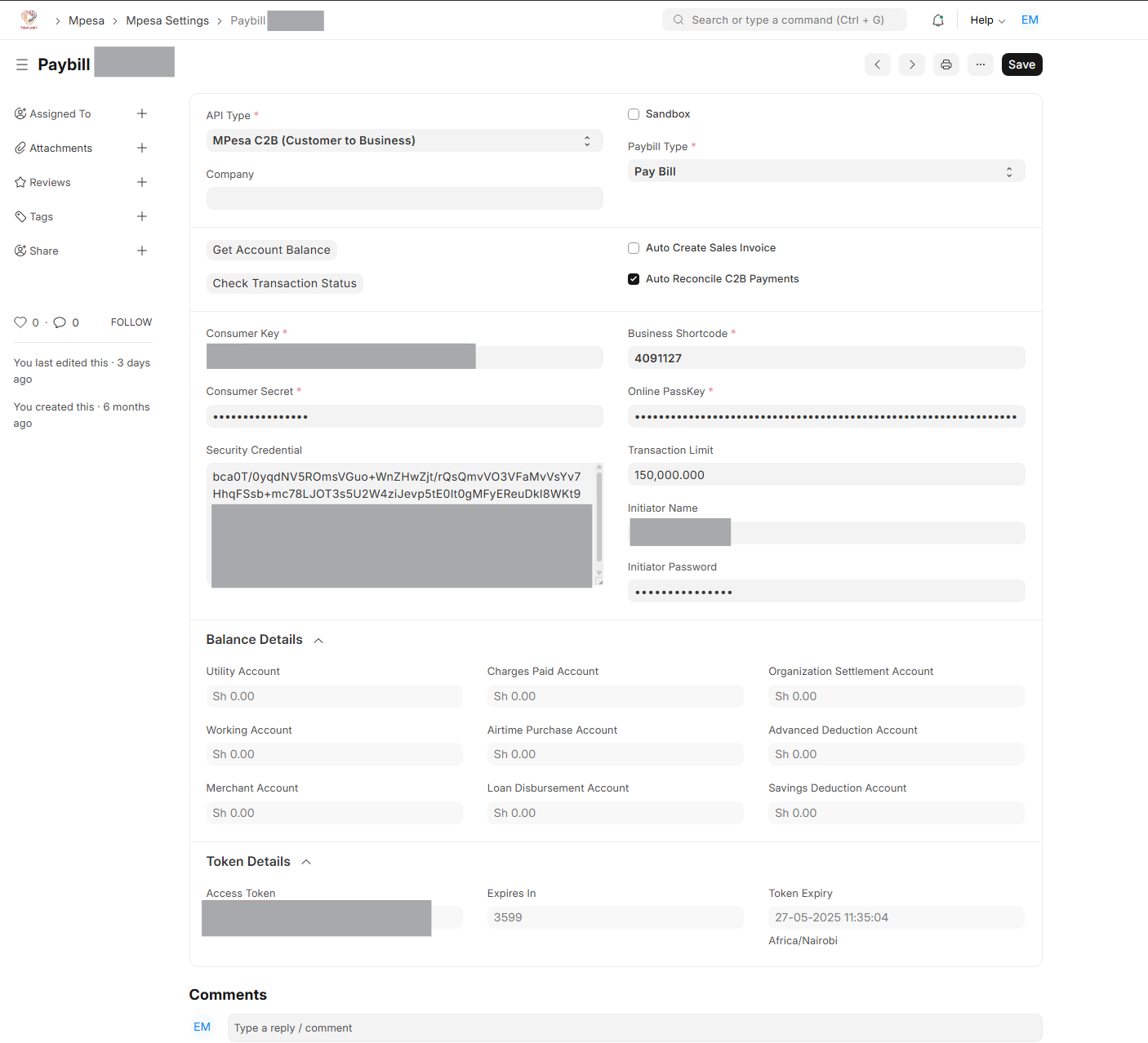 Mpesa Settings Doctype
Accessing Mpesa Settings
You can reach Mpesa Settings in two ways:
- Open the Mpesa workspace from the sidebar and click Mpesa Settings.
- Use the Awesome Bar (
Ctrl + G/Cmd + G) and search forMpesa Settings.
Creating an Mpesa Settings Record
Click New to create a configuration record. Fill in the fields described below.
API Type
Select the payment service this record will configure:
- Mpesa Express: For STK Push (payment prompts to customers)
- C2B: For receiving payments from customers via Paybill or Till
- B2C: For disbursing payments to employees or suppliers
Each API type may require different credentials. You can create multiple records one for each API type.
Field Reference
| Field | Description |
|---|---|
| API Type | The Mpesa service this record configures: Mpesa Express, C2B, or B2C. |
| Consumer Key | A unique key from Safaricom used to authenticate API requests. |
| Consumer Secret | A secret paired with the Consumer Key to secure API access. |
| Business Shortcode | Your business identifier in the M-Pesa system (Paybill or Till number). |
| Online PassKey | Used exclusively for Mpesa Express (STK Push) transactions. |
| Till Number | Required for C2B payments where customers pay to a Till number. |
| Initiator Name | The API Operator username configured in the M-Pesa Org Portal. Required for B2C and Transaction Status. |
| Initiator Password | The password paired with the Initiator Name. This is encrypted to generate the Security Credential. |
| Security Credential | An encrypted credential used in B2C transactions. Generated from the Initiator Password and the Mpesa Public Key Certificate. |
Mode of Payment
After saving an Mpesa Settings record, you must link it to a Mode of Payment in ERPNext. This is how the system knows which Mpesa configuration to use when a payment is initiated from a Sales Invoice, Sales Order, or B2C disbursement.
To link:
- Open Accounts > Mode of Payment.
- Create or open the relevant Mode of Payment (e.g., "M-Pesa").
- In the Payment Gateway Account section, select the Mpesa Settings record.
Public Key Certificate
For B2C transactions, the app encrypts the Initiator Password using Safaricom's public key certificate. The Mpesa Public Key Certificate DocType stores these certificates for both environments:
- Sandbox Certificate: Used during development and testing.
- Production Certificate: Used for live transactions.
Navigate to Mpesa Public Key Certificate and ensure the correct certificate is saved before attempting B2C disbursements. The certificates are available from the Safaricom Developer Portal.
Auto Reconcile C2B Payments
Within Mpesa Settings, there is an option labeled Auto Reconcile C2B Payments. When enabled, the system will automatically attempt to match incoming C2B payments to outstanding invoices as soon as the payment record is submitted. If no matching invoice is found, it applies the payment to the customer's oldest outstanding invoices using FIFO (First-In First-Out) logic.
This option is recommended for businesses with a predictable invoice reference flow. Disable it if you prefer to manually review and match payments.
Token Management
Access tokens are generated automatically using the Consumer Key and Secret and are stored within the Mpesa Settings record. The app reuses a valid token for all requests until it expires, at which point a new one is requested. No manual token management is required.