





Rent billing by Item Price
Rent for a leased property can be billed in one of two ways. Auto Repeat copies a reference Sales Order or Sales Invoice on a schedule and applies increments as it goes. Item Price writes the whole rent schedule as dated Item Prices, and bills each month at the price valid on its billing date. Choose the default in Utility Billing Settings under Rent Billing Approach. Each requested property can also set its own.
Service items
Every leasable property bills rent through its own service item, named after the property. With Auto Create Property Service Item turned on, the item is created when the property is saved, in the Service Item Group from Settings. Group properties never get one.
Build the schedule
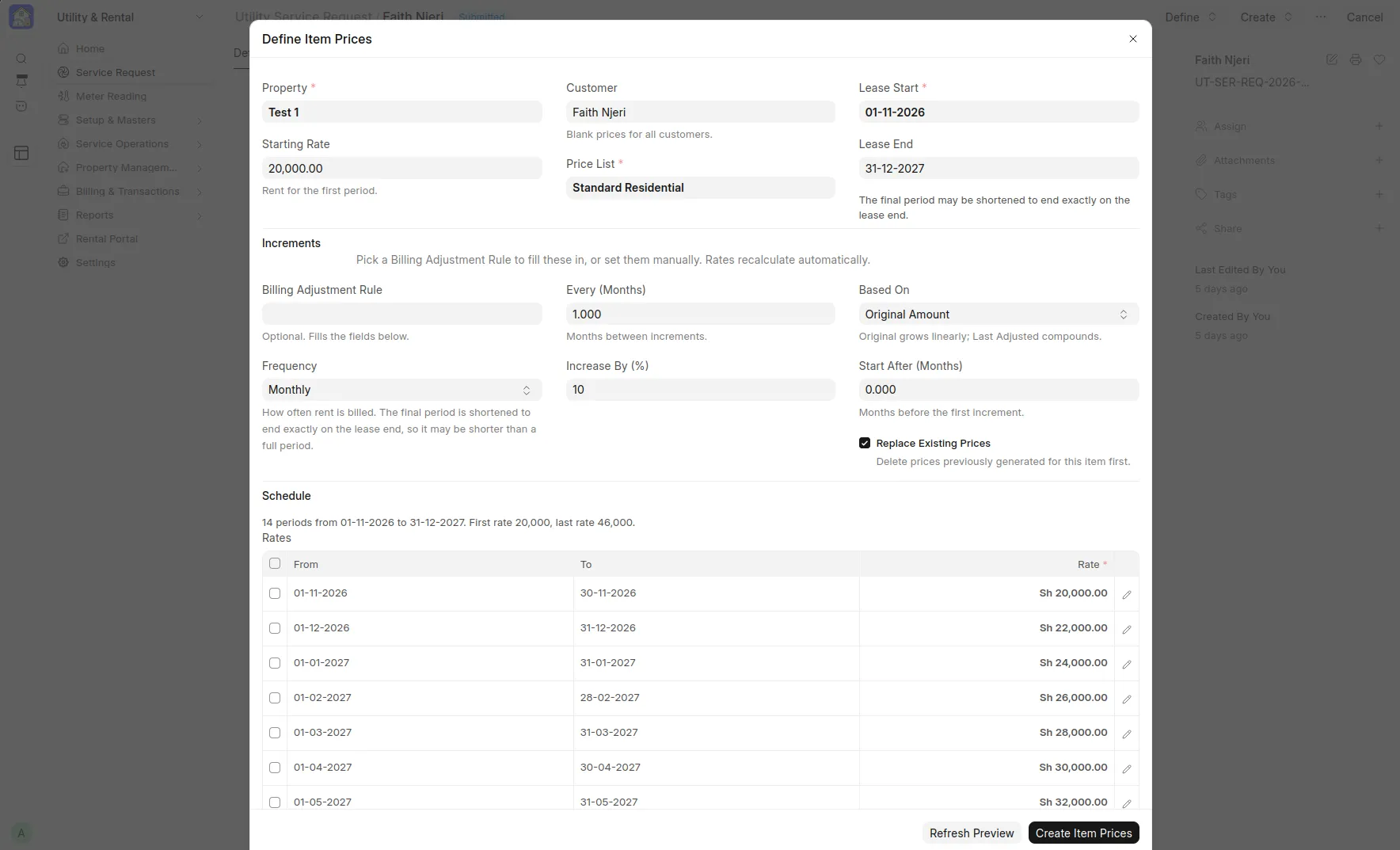
- Open a submitted Utility Service Request and choose Define > Item Prices.
- For each property, enter the Starting Rate and the lease dates.
- Pick a Billing Adjustment Rule, or set the increments yourself: how often, by how much, and whether each increase is on the original rent or compounds on the last one.
- Choose Refresh Preview. The Rates table shows the schedule, and you can change any row by hand.
- Choose Create Item Prices.
The schedule must cover the whole contract with no gaps or overlaps, or nothing is written. One Item Price is created for each stretch where the rate stays the same.
Price list
The request’s price list is used. If it has none, the customer’s default is used. Replace Existing Prices first deletes every price for that property’s item on that price list and customer, including prices entered by hand.
Correct prices later
The Item Price Schedule section of the request shows the Item Prices for each property. Change dates and rates, add or remove periods, and save. A change that leaves part of the contract unpriced is refused, and nothing is written.
How rent is invoiced
Each day the app checks every active requested property that is set to Item Price with auto billing on. On the property’s billing date (the first day, the last day, or a chosen day of the month) it creates a draft Sales Invoice for the month. The rent line takes the Item Price valid on that date and cannot be changed by hand. A month that is already billed is never billed again, and lines must fall within the lease.
If something does not work
See Troubleshooting.