









3.1 Company and Accounting
Set up your business as an ERPNext Company with the correct currency, chart of accounts, fiscal periods, and stock accounting configuration. Work with your accountant to choose the ledger accounts used for your farm activities.
Configure livestock settings
- Open Company from Desk search and select your Company.
- Review the livestock stock entry difference account fields: Feeding, Mortality, Treatment, Egg Production, and Capitalization.
- Select appropriate accounts in that Company. Your medical stock issues need the Treatment Stock Entry Difference Account in the same Company and currency. Choose appropriate non-Stock difference accounts.
- Find Auto-close Performance ToDos on Recovery, placed in the Lvm Settings tab, and decide whether it should be enabled. The default is off, leaving verified recovered tasks open for manual closure.
- Save your Company settings. Review the first posted transaction with your accountant to confirm its stock and ledger effects.
The screenshot below shows demo accounts, consult your accountant/ERPNext consultant for proper account mapping.
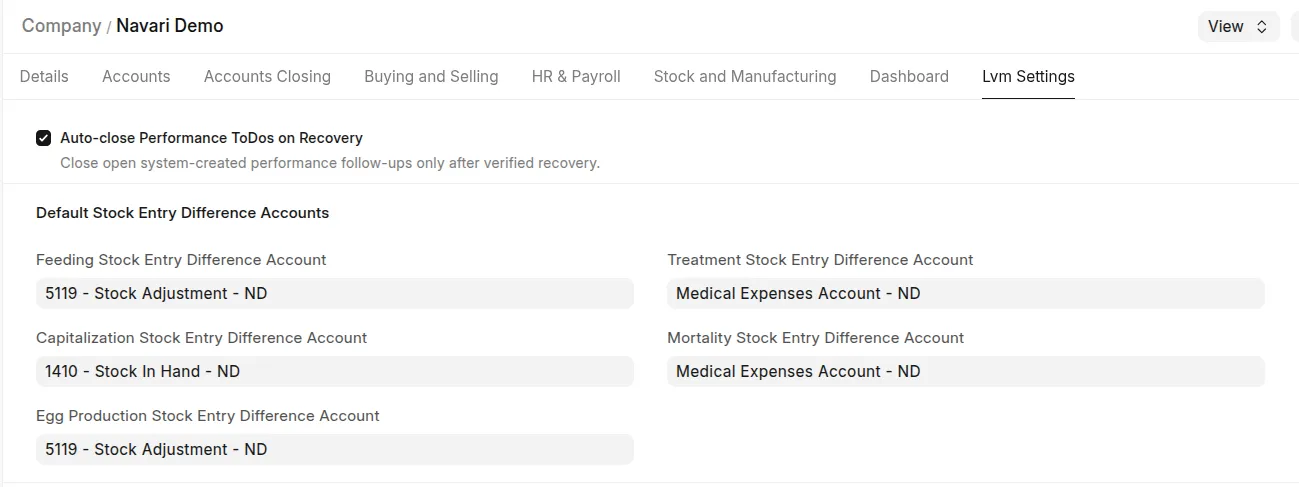 Company livestock difference accounts and recovery auto-close setting, using demo account names
The app maps these Company settings to difference accounts on supported Stock Entry rows before saving. Normal ERPNext accounting validations still apply. A setting does not create opening stock, determine farm accounting policy, or approve capitalisation automatically.
Last updated 3 weeks ago
Was this helpful?