









4.6 Produce Collection
Record the eggs and other produce you collect from each flock, including their quantities and destination store. Your submitted produce receipts add output stock without increasing animal population.
- Configure distinct produce Items and destination stores.
- Select the livestock Batch and House in Daily Farm Entry, then choose Produce.
- Add produce Item, positive quantity in stock UOM, destination warehouse, required inventory Batch, and positive valuation rate.
- Save and review the draft Produce Collection / Material Receipt before submitting.
- Review period produce totals and, for eligible laying flocks, hen-day yield in the batch performance report.
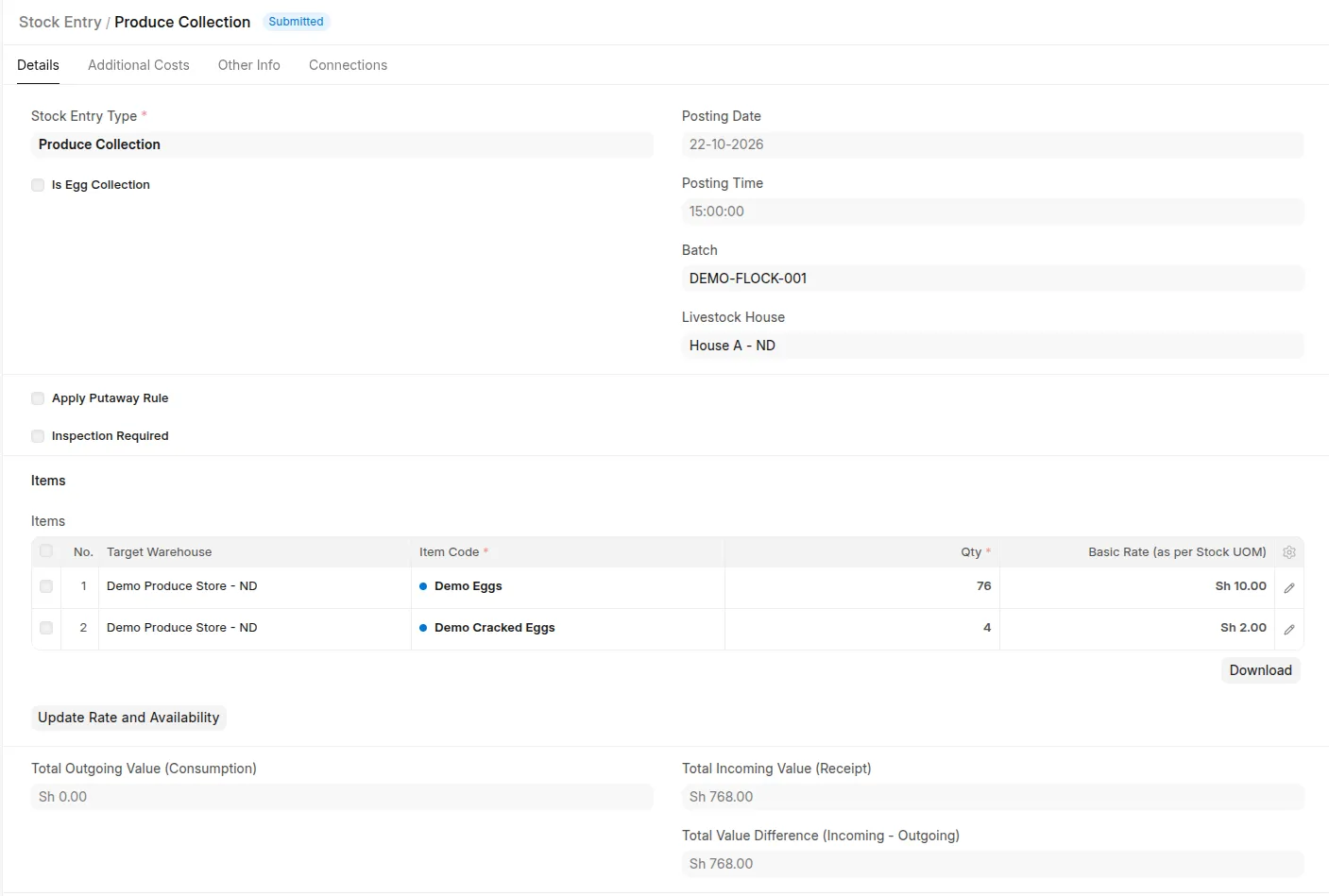 Submitted Produce Collection with separate normal and damaged egg Items, stock counts, and destination store.
For hen-day yield, configure all laid egg categories in the assigned all-female profile, including cracked/damaged eggs. Non-egg produce does not count toward that yield.
If entering trays/cartons on the standard Stock Entry form, verify their conversion to count stock UOMs. The report uses stock quantity once; it must not multiply an already-converted count again. Daily Farm Entry itself takes stock-UOM quantities.
Use the batch performance report to review Produce Collection receipts. The separate Produce Report selects Production-type entries, so it may not show those same receipts. See Operational Reports.