









5.2 Batch Performance Report
Use Livestock Batch Performance report to review each of your flocks in one row. Compare its stock movements, feeding, weight, and produce with the age-based targets you have assigned.
Run the report
- Search for the report in Desk or open its Livestock workspace link.
- Select required Company, From Date, and To Date. Dates default to the last 30 days through today.
- Optionally select Batch and Livestock House / Warehouse. The Batch must belong to the selected Item and House to the selected Company.
- Run the report and read Data Notes alongside numeric results.
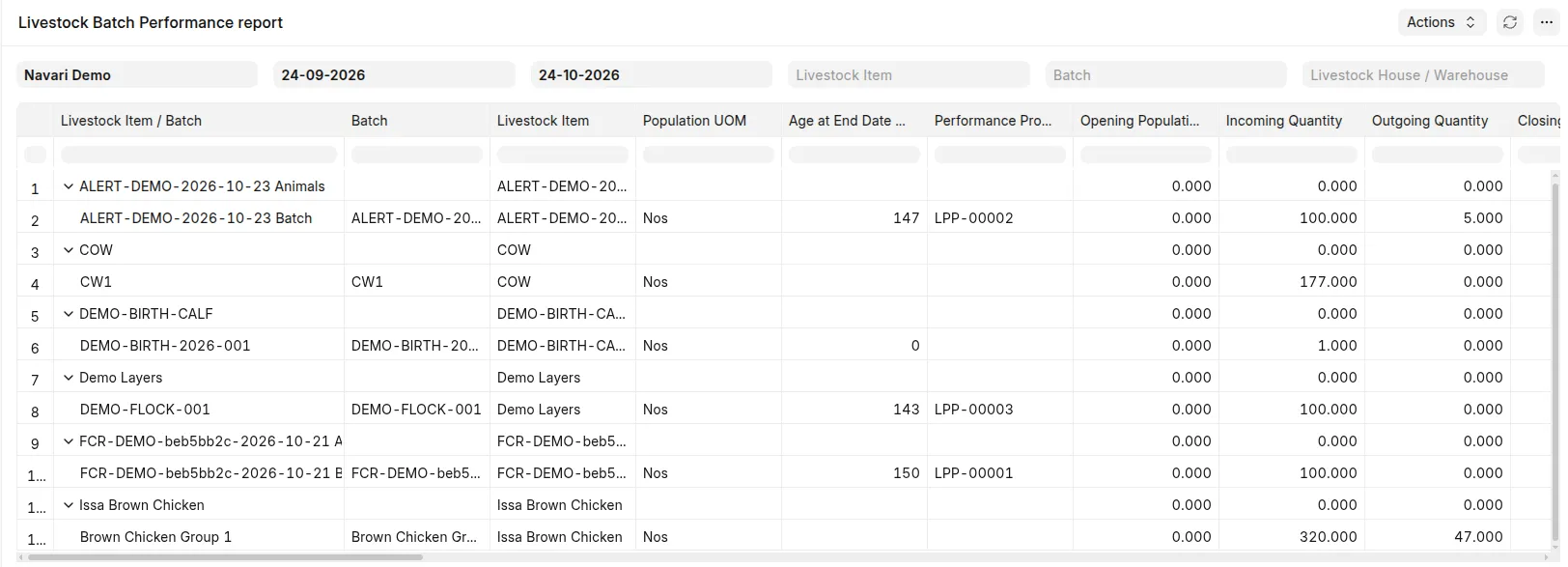 Report filters and population, feed, and measurement columns for one flock.
Read the hierarchy
Expand or collapse an Item to show its Batches. Each indented Batch keeps its own population, weight, feed, produce, targets, and Data Notes. Item rows are headings only: ratios, percentages, and quantities with different units are not combined into Item totals.
The first Livestock Item / Batch column links headings to Items and child rows to Batches. Items and Batches are sorted by their identifiers. Historical batches do not need the dashboard's Is Livestock Item checkbox to appear in this report.
Read the columns
| Group | What to review |
|---|---|
| Identity | Batch, Item, population UOM, age at report end, assigned profile |
| Population | Opening, incoming, outgoing, closing, period mortality, period survival |
| Measurements | Latest valid average weight, timestamp, sample size, and measurement age |
| Consumption and output | Period feed in kg, generic produce quantity and its UOM |
| Interval FCR | Actual ratio and start/end measurement dates |
| Targets | Weight/feed/FCR targets, actual-minus-target variances and percentages |
| Laying performance | Configured egg count, actual/target hen-day yield, variance in percentage points |
A Batch without a profile can still show available actuals; target columns remain blank. Biological target age needs Hatch/Birth Date. Weight comparison age is the measurement age, not report-end age.
Select a House where a Batch occupies multiple houses; one house's sample does not represent all animals automatically. Multi-house eligible FCR intervals are combined by biomass gain, and notes explain interval differences. Do not assume period feed and interval FCR use identical dates.